

Have you ever wondered how your browser finds the correct website when you type a domain name like www.telahosting.co.ke? The answer lies in nameservers. Nameservers are a key part of how the internet works, helping connect your domain name to the hosting server where your website files are stored.
If you run a website in Kenya, understanding nameservers can help you avoid common issues when connecting your domain, launching a new site, moving hosting, or setting up business email.
What Are Nameservers?
A nameserver is a server that helps direct your domain name to the correct hosting server. In simple terms, it works like a directory that tells the internet where your website lives.
When someone types your domain name into a browser, nameservers help translate that domain into the correct server location so the website can load.
For example, when someone enters www.jumia.co.ke, the nameserver helps connect that domain to the right server IP address so the website can open properly.
If you are new to domains, it also helps to first understand what a domain name is and how it works with IP addresses. Nameservers make that connection practical by pointing the domain to the right hosting environment.
How Nameservers Work
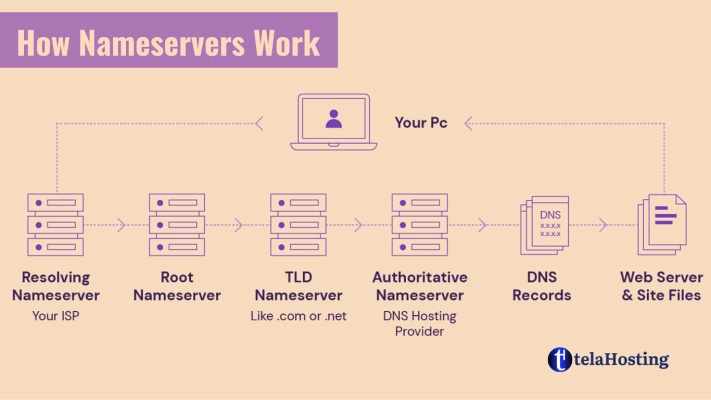
Here is a simple step-by-step explanation of how nameservers work:
- You type a domain name into your browser.
For example, you enter www.jumia.co.ke or www.safaricom.co.ke. - Your browser starts a DNS lookup.
The browser needs to find out which server is hosting that website. - The nameservers respond with the correct DNS information.
They return the records that point the domain to the correct hosting server. - Your browser connects to the server.
Once the correct server address is found, the website begins to load.
Think of Nameservers Like a Directory
A simple way to understand nameservers is to think of them as an online directory service.
If someone asks for the location of a popular place in Nairobi, Mombasa, or Kisumu, you would provide directions to the right destination. Nameservers do something similar online. They help direct internet traffic to the correct hosting server for a domain name.
Why Nameservers Matter for Websites in Kenya
Nameservers are especially important for website owners in Kenya because they affect how quickly and correctly your domain connects to your hosting provider.
They matter when you are:
- launching a new website
- connecting a .co.ke domain to hosting
- moving your website to a new hosting provider
- setting up business email for your domain
- transferring your domain between registrars
If your nameservers are not set correctly, your website may not open, your email may fail, or your visitors may be sent to the wrong server.
Where Are Nameservers Used?
1. Connecting a Domain to Web Hosting
When you register a domain and buy hosting, you usually need to point the domain to your hosting provider’s nameservers so your site can go live.
This is common for Kenyan domains such as:
- .co.ke
- .or.ke
- .ac.ke
- .sc.ke
2. Setting Up Business Email
If your business uses custom email addresses like [email protected], DNS settings managed through your nameservers help route email correctly using records such as MX, SPF, DKIM, and others.
3. Domain Transfers and Website Migrations
If you transfer your domain or move your website to another host, your nameservers or DNS settings may need to be reviewed so your website and email continue working without interruption.
Real-Life Examples from Kenya
Example 1: Launching a Small Business Website
Imagine you register www.nairobifashions.co.ke and want to host the website with telaHosting. You may be given nameservers like:
- dns1.tela-host.com
- dns2.tela-host.com
Once you update your domain to use those nameservers, the internet knows where your website files are stored, and your visitors can access the site.
Example 2: Setting Up Email for a School or Institution
A school or institution using email addresses like [email protected] will rely on proper DNS and nameserver settings to ensure messages are delivered correctly.
Common Nameserver Formats
Nameservers usually follow a simple format such as:
- dns1.tela-host.com
- dns2.tela-host.com
Depending on the hosting platform, you may also see alternatives such as:
- da1.tela-host.com
- da2.tela-host.com
Relationship Between Domain Name, Nameservers, and Web Hosting
| Component | Meaning | Role |
|---|---|---|
| Domain Name | A human-readable web address such as www.example.co.ke | Helps users identify and visit your website |
| Nameservers | Servers that direct the domain to the right DNS records | Connect the domain name to the correct hosting setup |
| Web Hosting | The server space where your website files are stored | Makes your website accessible online |
How to Check and Update Nameservers
If you need to update your nameservers, follow these steps:
- Log in to your domain registrar account.
This is the company where your domain name was registered. - Find the domain management area.
Look for options like Manage Domain, DNS, Nameservers, or Domain Settings. - Replace the current nameservers.
Enter the nameservers provided by your hosting provider, such as ns1.telahosting.com and ns2.telahosting.com. - Save the changes.
After saving, allow time for DNS propagation. In many cases changes begin showing quickly, but full propagation can take up to 48 hours.
How Long Do Nameserver Changes Take?
Nameserver updates can begin working within a few minutes, but global DNS propagation may take up to 48 hours. Some users in Kenya may see the changes earlier than others depending on their internet provider and cached DNS records.
What Happens If Nameservers Are Wrong?
If your nameservers are misconfigured or still pointing to an old host, you may notice problems such as:
- your website not loading
- your website loading from the wrong server
- business email not working properly
- website downtime after migration
This is why it is important to double-check your nameserver settings whenever you change hosting or connect a new domain.
Why Nameservers Are Important
- They connect your domain to your hosting.
- They help visitors access your website correctly.
- They support email delivery and DNS-based services.
- They make it possible to move hosting without changing your domain name.
Frequently Asked Questions About Nameservers
What happens if I do not update my nameservers?
If your domain is not pointing to the correct nameservers, your website may not load from the correct hosting server, and email services may also be affected.
How do I know which nameservers to use?
Your hosting provider normally sends the correct nameservers in your welcome email or shows them in your hosting dashboard.
Can I use nameservers from one host while hosting somewhere else?
Usually, you should use the nameservers given by the provider managing your DNS or hosting. If you use a separate DNS provider like Cloudflare, the setup may be different.
Can nameservers affect website speed?
Yes. Poor DNS performance or misconfigured nameservers can slow down domain resolution, which may delay how quickly a website begins loading.
Final Thoughts
Nameservers are a vital part of connecting your domain name to your hosting service. Whether you are launching a new business website in Kenya, setting up email for your organization, or moving your domain to a new hosting provider, understanding how nameservers work can help you avoid common issues.
If you want reliable hosting and domain services for your Kenyan website, visit telaHosting Kenya to get started.